ブログに掲載したい商品のリンクをワンストップで作成できる、WordPressプラグインのRinker(リンカー)
今回の記事ではこの「Rinker」で発生する、401:AmazonAPIのステータスエラーへの対策方法を解説します。
401:AmazonAPIのステータスエラー
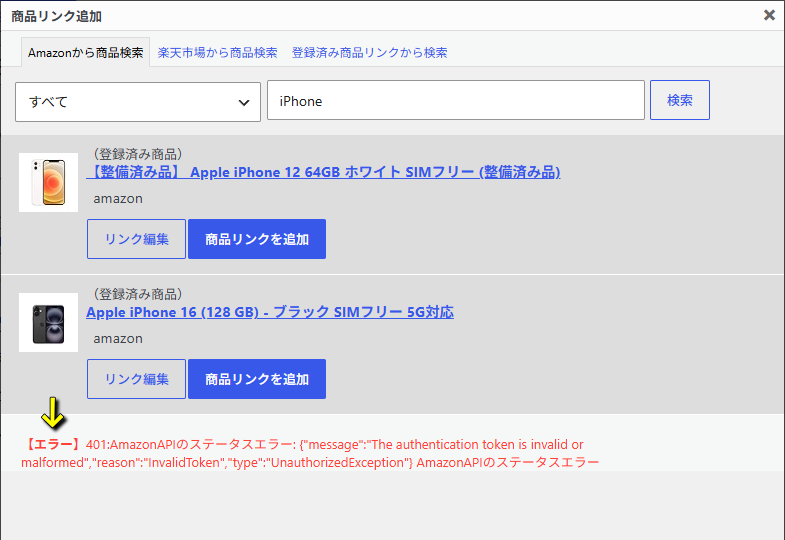
この記事で対策するRinkerのエラーは、Rinkerで「Amazonから商品検索」を行った際に表示されます。
エラー
401:AmazonAPIのステータスエラー: {"message":"The authentication token is invalid or malformed","reason":"InvalidToken","type":"UnauthorizedException"} AmazonAPIのステータスエラー
ステータスエラーの対策方法
401:AmazonAPIのステータスエラーを直すには、まず目的の「yyi_rinker_main.php」をバックアップします。
yyi_rinker_main.phpをバックアップしたら「直接テキストエディタ」で開くか、下記の手順で「yyi_rinker_main.php」を開きます。
1️⃣プラグイン
2️⃣プラグインファイルエディター
3️⃣編集するプラグインを選択 ⇒ Rinker
4️⃣選択
5️⃣yyi_rinker_main.php
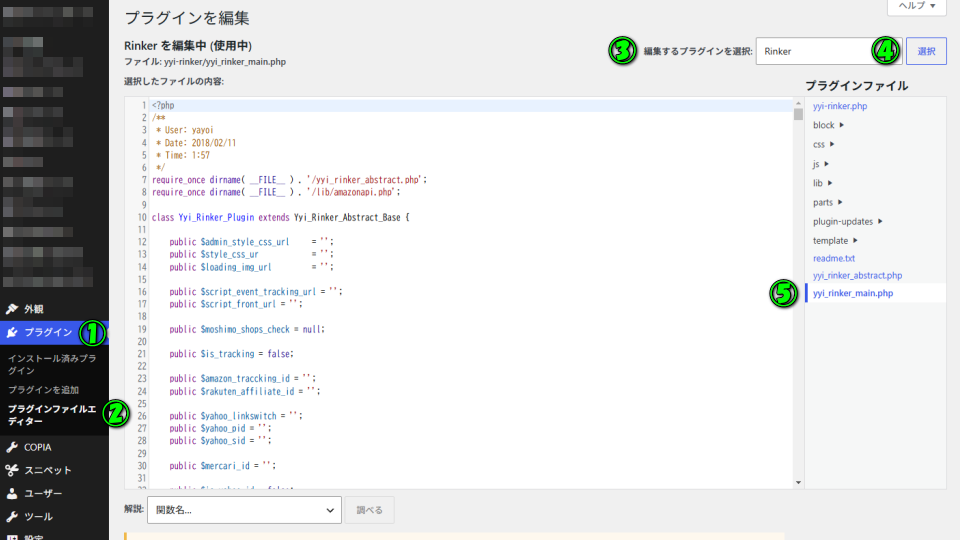
yyi_rinker_main.phpを開いたら「2286行目から2296行目まで」を、
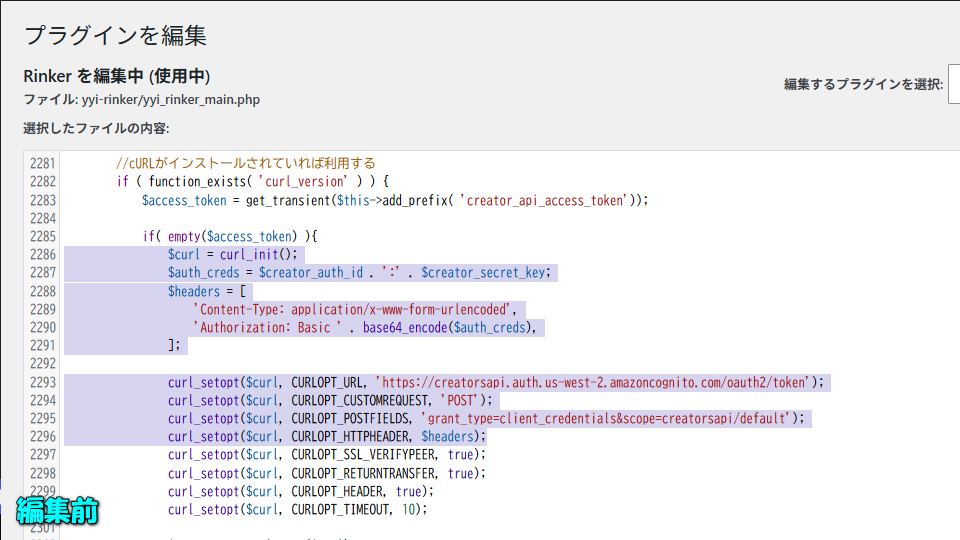
編集前
$curl = curl_init();
$auth_creds = $creator_auth_id . ':' . $creator_secret_key;
$headers = [
'Content-Type: application/x-www-form-urlencoded',
'Authorization: Basic ' . base64_encode($auth_creds),
];
curl_setopt($curl, CURLOPT_URL, 'https://creatorsapi.auth.us-west-2.amazoncognito.com/oauth2/token');
curl_setopt($curl, CURLOPT_CUSTOMREQUEST, 'POST');
curl_setopt($curl, CURLOPT_POSTFIELDS, 'grant_type=client_credentials&scope=creatorsapi/default');
curl_setopt($curl, CURLOPT_HTTPHEADER, $headers);
下記の文字列に書き換えます。
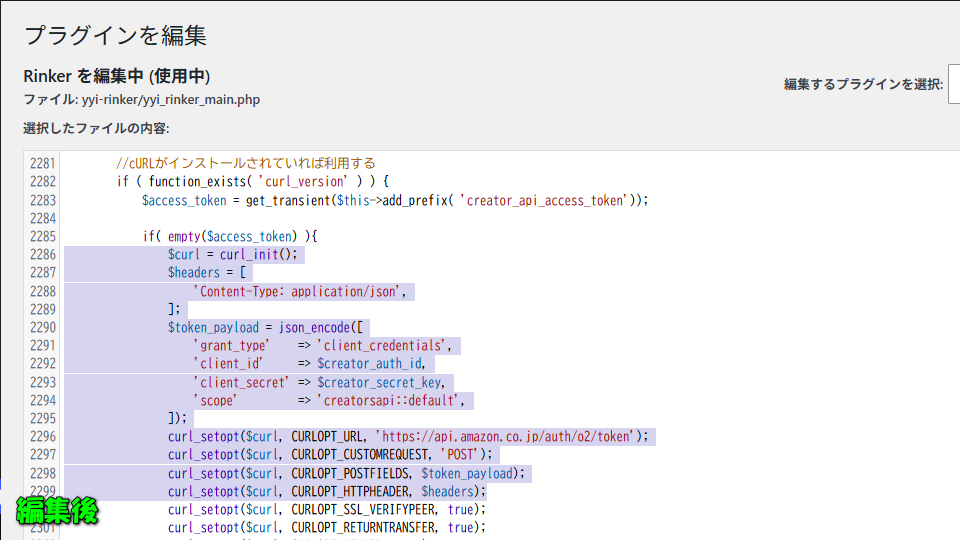
編集後
$curl = curl_init();
$headers = [
'Content-Type: application/json',
];
$token_payload = json_encode([
'grant_type' => 'client_credentials',
'client_id' => $creator_auth_id,
'client_secret' => $creator_secret_key,
'scope' => 'creatorsapi::default',
]);
curl_setopt($curl, CURLOPT_URL, 'https://api.amazon.co.jp/auth/o2/token');
curl_setopt($curl, CURLOPT_CUSTOMREQUEST, 'POST');
curl_setopt($curl, CURLOPT_POSTFIELDS, $token_payload);
curl_setopt($curl, CURLOPT_HTTPHEADER, $headers);
文字列を書き換えたら、ページ下部の「ファイルを更新」から変更を保存します。
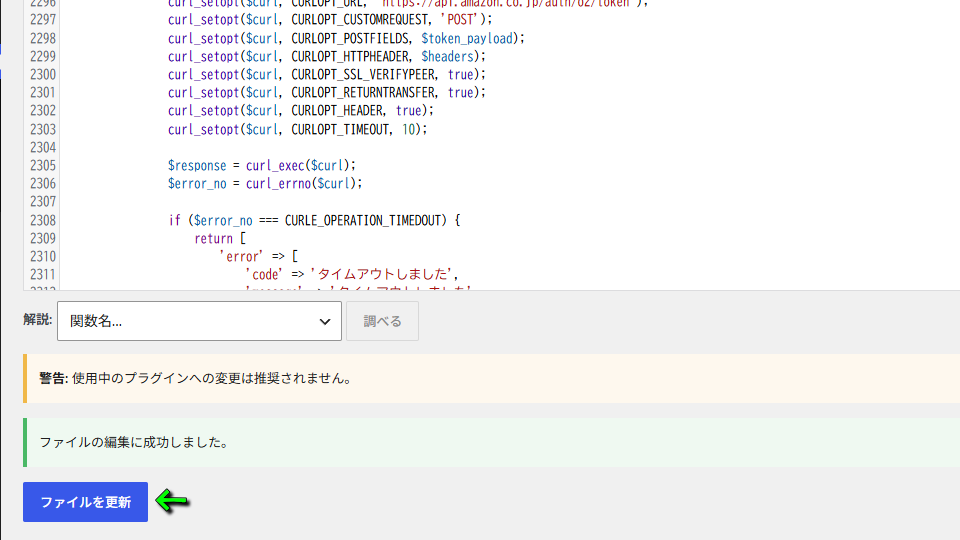
ステータスエラーの対策確認
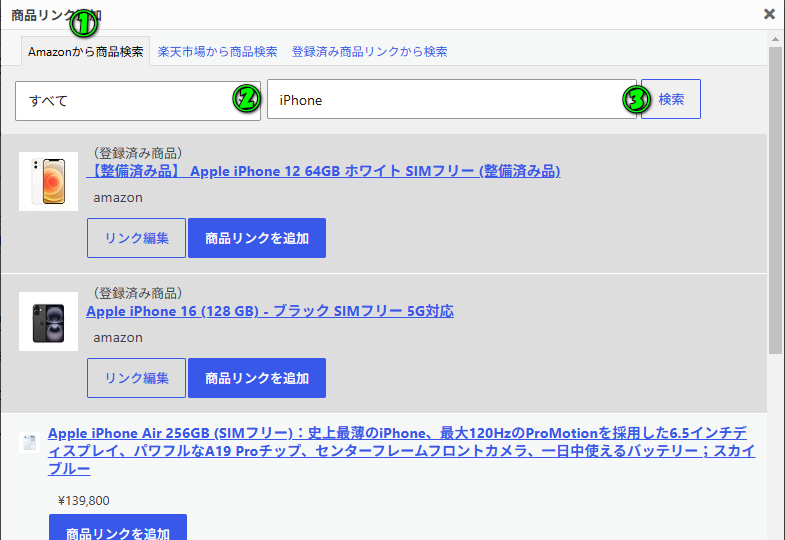
上記の手順で「yyi_rinker_main.php」を更新したら、Rinkerの「商品リンク追加」を試します。
1️⃣~3️⃣の方法でAmazonから商品情報を取得し、問題なく「商品リンクを追加」が機能すれば完了です。
1️⃣Amazonから商品検索
2️⃣検索したい商品「任意の文字列」を入力
3️⃣検索
Creators API優先の設定方法
ちなみにこの記事と関連する「Creators API優先の設定方法」は、別記事で詳しく解説しています。
-

-
【Rinker】このアクセスキーは、Product Advertising APIにアクセスするために有効になっていません【対策方法】
商品リンクをかんたんに作れるWordPressプラグインとして、多くの利用者がいるというRinker(リンカー)
今回の記事ではこの「Rinker」で、Amazonの商品リンクが作成できない時の対策方法について解説します。続きを見る